Webflow
Webflow vs WordPress security: plugin risk and a practical decision
 8minutes read
Webflow usually reduces plugin-driven risk because you run fewer third-party components. WordPress can be just as safe when you can govern plugins and patch fast. This guide shows what actually breaks, with concrete thresholds you can operate.




The webflow vs wordpress security question rarely starts as a philosophical debate. It usually appears after a marketing site keeps shipping small fixes under deadline pressure, and every fix adds one more moving part that nobody is paid to own.
WordPress plugins are the usual culprit in that story. A team adds a form plugin, then a popup tool, then a SEO helper, then a cache plugin to fix what the last plugin slowed down. Months later, a critical update lands, it sits uninstalled, and automated scanners find the gap before you do.
Overview
This article compares WordPress and Webflow through one lens: how each platform changes your day-to-day security burden when a marketing team needs to publish and iterate quickly.
If you are evaluating webflow vs wordpress security, focus less on abstract platform claims and more on whether you can keep every extension, permission, and update stream owned and current.
Webflow usually reduces plugin-driven risk because most common marketing-site needs are built into the hosted product, so you ship fewer third-party components that can turn into urgent patch work. WordPress can be equally safe, but the path depends on governance: keeping the plugin set small, assigning ownership, and applying security updates quickly and consistently.
If you want fewer moving parts and you can live within an integrated platform, Webflow tends to be the easier stack to operate safely. If you need deep server-side customization, complex integrations, or a very specific CMS behavior and you have the capacity to maintain it, WordPress remains a strong option.
By the end, you will have two policies you can copy - a plugin budget for WordPress and an app/embed budget for Webflow - plus concrete thresholds that tell you when your site is drifting into a risk profile you are unlikely to sustain.
Is Webflow more secure than WordPress?
In most marketing-site setups, Webflow is easier to keep secure because it avoids the common WordPress failure mode where many third-party plugins run on your server and require constant patching. WordPress security can match that outcome when plugin count stays low, updates ship fast, and admin access is tightly controlled.
The practical takeaway is simple: security follows your operating model. Choose the platform whose maintenance workload fits your team, then enforce a few rules that keep that workload from silently expanding.
Why does "one more plugin" increase security risk?
Plugins are not automatically dangerous, and many are well engineered. The WordPress plugin security risks that hurt teams tend to come from accumulation: each install adds code you did not write, permissions you might not fully understand, and an update stream that can become urgent with little warning.
That creates three predictable pressures.
First, the attack surface expands with every installed component, including the components you forgot you installed. Vulnerabilities concentrate where code changes frequently and where many authors ship features at different quality levels, which is exactly how large plugin ecosystems work.
Second, responsibility gets blurry. A plugin might be "owned" by an agency, a past contractor, or the person who installed it during a launch week. When a security update appears, nobody has a clear mandate to stop everything and patch.
Third, patch lag is normal for marketing teams. Updating a plugin can break a layout, affect tracking, or change a form flow, so teams postpone updates until a safe window appears. Attackers do not wait for safe windows, and the scanning is automated, cheap, and continuous.
You can run WordPress securely, yet you have to treat plugins like dependencies in a production system. That means inventory, ownership, and a patch SLA, even when the site feels "just marketing."
When plugins go wrong: two real patterns you can recognize
A concrete pattern helps you build the right habits without leaning on scare stories.
Most WordPress plugin vulnerabilities that impact real sites cluster into a few repeatable categories, which is useful because you can design policies around patterns instead of chasing headlines.
Pattern 1: critical bug + automated scanning + site takeover
In 2020, the WordPress File Manager plugin had a critical vulnerability (CVE-2020-25213) that was actively exploited in the wild. The mechanics were straightforward: a weakness in how the plugin handled file uploads made it possible for attackers to place malicious code on the server, which is the point where a compromise becomes a full site takeover. CVE-2020-25213 (NVD)
The useful lesson is the tempo. Once a critical exploit path becomes known, scanners fan out across the internet quickly, and your site’s risk starts to correlate with one number: how long you stay unpatched after the vulnerable version exists.
Pattern 2: data exposure through a popular feature surface
Takeovers are not the only risk. Many vulnerabilities are about information exposure, and the damage can be quieter. In late 2025, WooCommerce published an advisory for a Store API issue that could expose guest order information if exploited, and the advisory lists the specific customer fields involved. WooCommerce Store API advisory
For teams running e-commerce or capturing lead data, this is the right mental model: customer data exposure often arrives through the same path as feature velocity, which is why you need an explicit patch policy and a short list of trusted components.
What changes in Webflow’s model (and what you still own)
Webflow’s core security advantage in this comparison is structural. Most marketing-site functionality is delivered as part of the hosted platform, so you are usually not installing a long tail of third-party server-side code to get everyday work done.
That does not mean you never extend Webflow. You can install Apps from the Webflow Marketplace, and you can embed scripts for analytics, chat, forms, personalization, and A/B testing. Marketplace Apps go through a Webflow review that covers the in-scope security, authentication, and data-handling surface, although Webflow is explicit that approval is not a security audit of the App's entire system. Webflow Marketplace review guidelines
Webflow Apps security still depends on how you run your Workspace, especially around who can install Apps and how often you audit permissions and injected code.
The trade is that Webflow shifts the center of gravity. Instead of server-side plugin execution being the default extension path, the most common risks become operational:
- Who has admin access, and is 2FA enforced?
- What third-party scripts run on every page?
- Which Apps have permission to change sites or inject code?
- Where are API keys stored, and who can rotate them?
So Webflow reduces one common class of failure, yet it still demands discipline. If your team installs every shiny widget and shares admin logins, you can rebuild the same fragility in a different shape.
Webflow security habits that matter in practice
If you want the low-maintenance security profile people expect from Webflow, treat your Workspace like an internal production system, not like a design toy.
Start with access control. Keep the number of Workspace admins small, enforce 2FA, and remove access the moment a contractor engagement ends. A surprising share of real-world incidents across SaaS tools start with credential reuse and phishing, so the best "security feature" is simply making account takeover hard.
Next, manage Apps and embeds like dependencies. Create an inventory of installed Apps and third-party scripts, write down who owns each one, and review permissions on a schedule. In Webflow, a third-party script can see what the browser sees, which means it can often access page content, form interactions, and user input. The fewer scripts you run globally, the simpler your security story becomes.
Finally, keep custom code boring. When teams add custom JavaScript to bypass platform limits, they sometimes add fragile logic, leak keys into the client, or accidentally create redirect and injection issues. If the site needs a lot of custom behavior, treat that as a platform signal and re-evaluate whether the site is still within Webflow’s sweet spot.
Decision framework: choose the stack you can operate
This is the part most comparison posts skip. The right platform is the one whose failure modes you can realistically prevent.
Most webflow vs wordpress security debates become clearer once you measure who owns updates, who has admin access, and how many dependencies you are willing to keep in motion.
Choose Webflow when: - You want marketing velocity with fewer moving parts, and most requirements are CMS + pages + forms + integrations. - You can keep admin access tight and you are willing to audit Apps and scripts like dependencies. - Your team benefits from a hosted stack where security documentation, infrastructure, and patching are handled centrally.
Choose WordPress when: - You need deep server-side customization, unusual content models, or specific workflows that depend on the WordPress ecosystem. - You can enforce a plugin governance policy and patch quickly, including during marketing campaigns. - You can run the site as an owned production system, with monitoring, backups, and a plan for incident response.
If you are unsure, use measurable triggers instead of opinions. Track these for 60 days and choose based on what your team actually does:
- Patch speed: do security updates land within 48 hours, every time?
- Inventory clarity: can you list every plugin or script and name an owner for each?
- Admin discipline: do shared logins exist, and do ex-admins still have access?
If the answers drift in the wrong direction, the platform choice is already made for you by your operating reality.
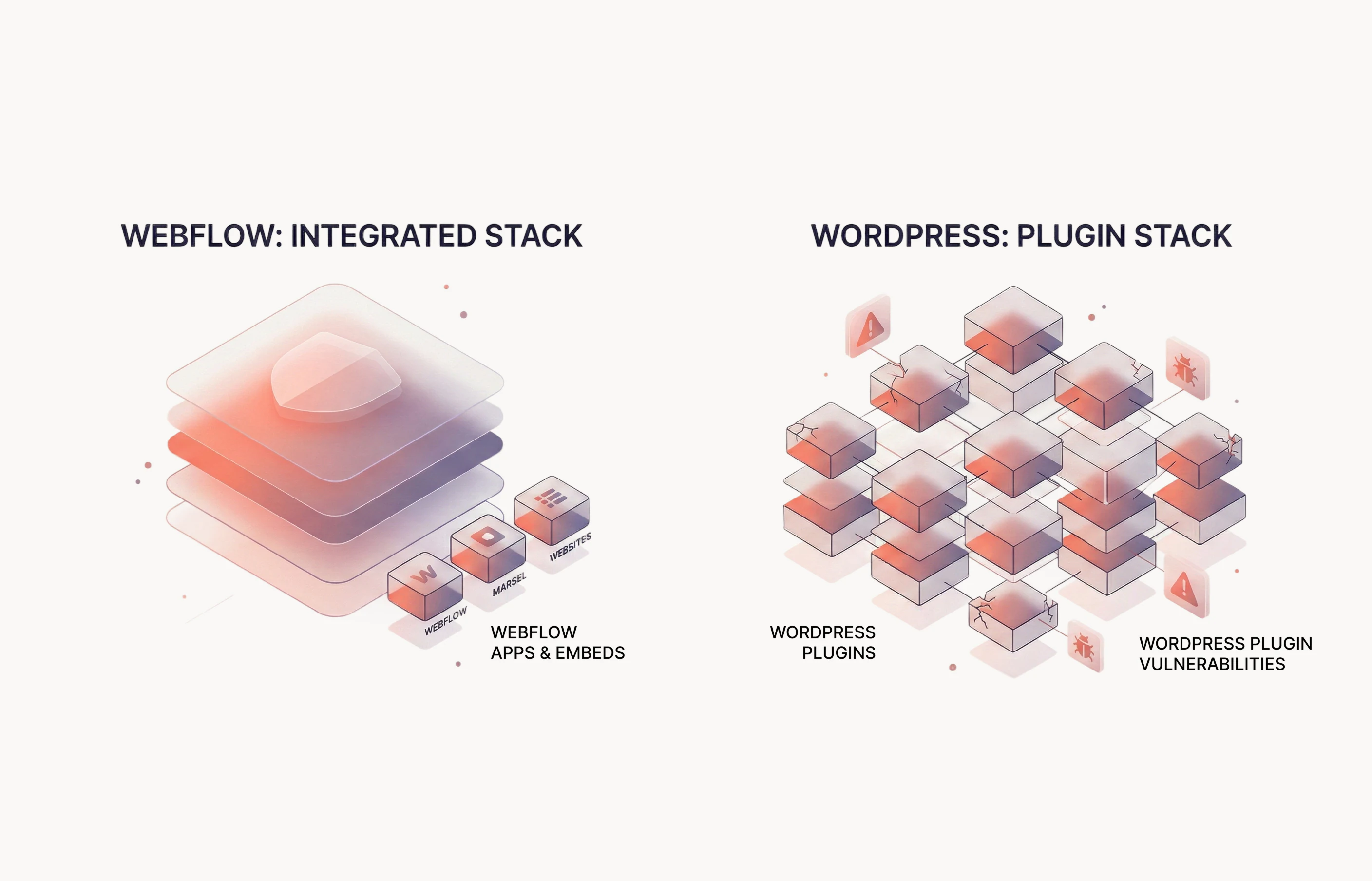
Two operating policies you can copy
Policies are useful because they stop the slow creep. They turn "be careful" into a concrete mechanism.
WordPress plugin budget (governance you can sustain)
Set a plugin budget and treat it like a performance budget. When the budget is exceeded, the next feature requires removing or replacing something, so the stack stays understandable.
Use thresholds that create forced clarity:
- Budget: stay under 10 active plugins that change runtime behavior.
- Ownership: every plugin has a named owner and a replacement plan.
- Patch SLA: critical security updates within 48 hours; everything else within 14 days.
- Review cadence: monthly review for 90 days, then quarterly.
When any of these fails twice in a 60-day window, freeze new plugin installs and pay down risk first. That can mean deleting plugins you no longer need, consolidating functionality, or moving to a managed WordPress security program with clear responsibilities.
Webflow app and embed budget (the plugin problem in a new outfit)
Webflow does not eliminate third-party code, it changes how it enters your site. Make that pathway explicit.
Define an app/embed budget:
- Apps: keep fewer than 3 Apps that have permission to write to sites or inject code, and review permissions every 60 days.
- Scripts: keep fewer than 5 third-party scripts running on every page, and scope scripts to only the pages that need them.
- Admins: keep fewer than 3 Workspace admins, enforce 2FA, and remove access immediately on offboarding.
If the site needs more than that, it usually means requirements have moved beyond a simple marketing stack. At that point, choose between two honest options: accept a heavier operating model and staff it, or simplify requirements until the site fits the platform again.
Next steps
If the webflow vs wordpress security question still feels abstract, start with an inventory. The list of installed components usually reveals the real maintenance load and the fastest risk reduction wins.
Pick your platform, then do the first cleanup pass this week:
- Make an inventory of plugins (WordPress) or Apps and third-party scripts (Webflow).
- Assign an owner to each component and set a patch SLA you can meet.
- Reduce admin access and enable 2FA everywhere.
- Confirm backups and a restore drill, so a compromise is recoverable.
If you are sitting on a plugin-heavy WordPress site and you want a lower-maintenance security profile, a staged migration to Webflow can pay down risk while improving publishing speed. If you need to stay on WordPress, the same governance approach still works, as long as someone owns it like production.
News & Insights


Start here
Bring us the agent that keeps braking
Tell us which workflow eats time, creates errors, or keeps landing back in a human review queue. We map the data, tools, risks, and escalation path before recommending anything.