Webflow
Figma to Webflow with AI: A Workflow That Ships
 5minutes read
AI can draft a layout fast. Shipping from Figma to Webflow stays fast only when you lock constraints, define states, and QA like a product.




You can get an AI to sketch a landing page quickly. The trap is what happens next: the mock looks “done,” approvals stack up, and the build turns into a second design cycle inside Webflow because the hard parts were never defined. If you are moving from Figma to Webflow, the same trap shows up as “import” optimism that collapses into hand-fixing classes, spacing, and responsiveness.
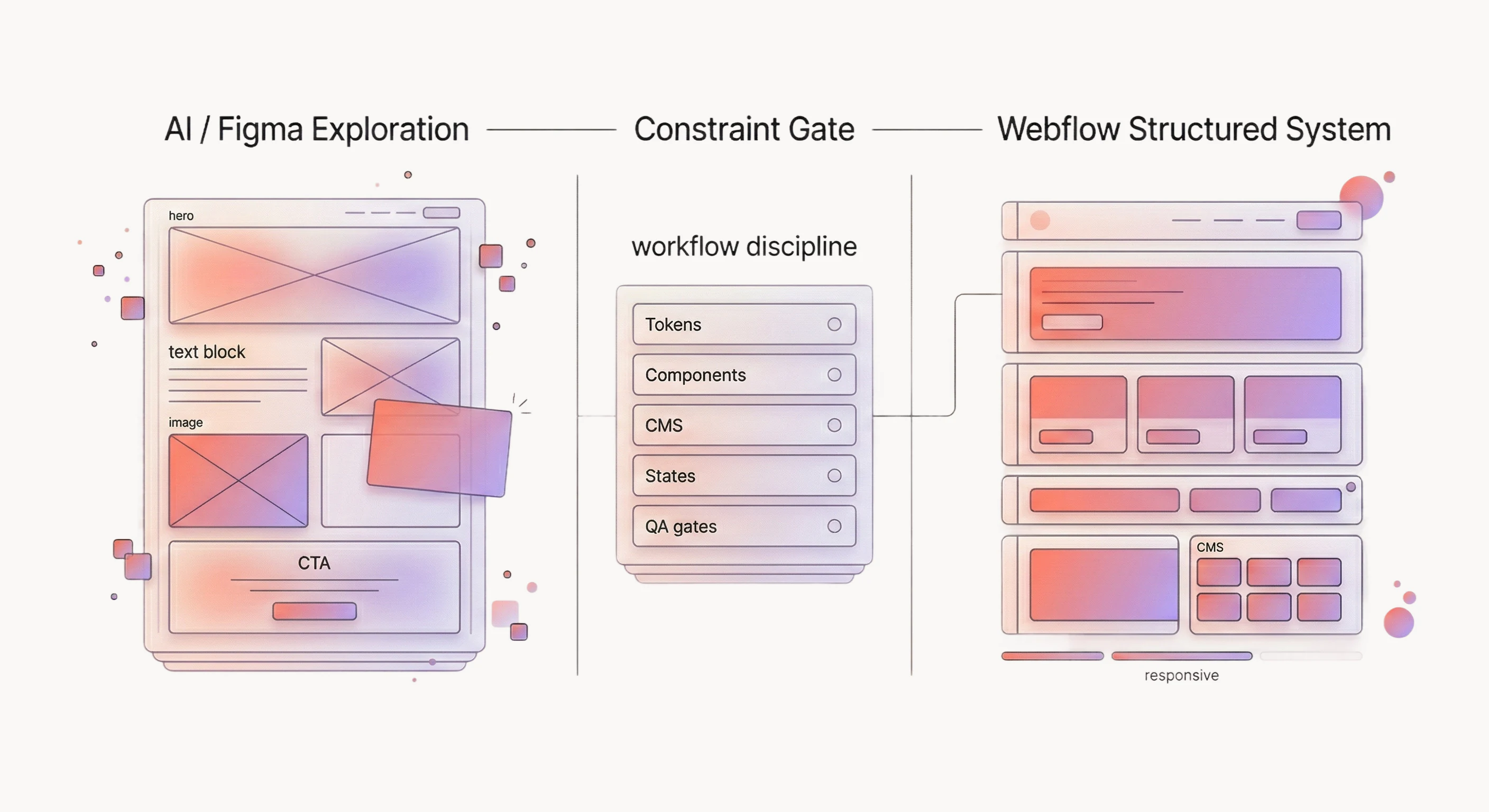
It looks like the loop keeps reopening: copy shifts, mobile breaks, and class names multiply. The workflow locks constraints and uses pass/fail gates so the build stays editable when content changes.
Overview
This article covers one practical path: use AI to explore layout directions, finalize a design system, then implement it in Webflow with enough structure that non-technical edits do not break the page. The short conclusion is simple: AI can accelerate exploration, but Webflow ships cleanly only when you define content, states, and rules that AI usually skips.
If you are shipping marketing pages, a CMS-driven site, or a small product site, this workflow usually pays off quickly because Webflow gives you production-grade layout, responsive controls, and editor-friendly content operations. If your “site” is actually a web app with authentication, user-specific dashboards, and heavy client logic, use AI for design exploration and move the build into a codebase where you can test, version, and deploy like software.
Is an AI-generated design good enough to build in Webflow?
Sometimes, yes, but only after you run it through a readiness check that converts “a picture of a page” into a system you can maintain. AI tends to produce a happy-path layout: it rarely defines CMS fields, error states, hover and focus behavior, or how the layout should behave when the copy is twice as long as the placeholder text.
Treat the AI output as a direction, then answer three questions before you open Webflow:
- What content is real, and where does it live (static copy vs CMS)?
- What states exist for each component (hover, focus, error, loading, empty)?
- What rules stay consistent across pages (type scale, spacing, buttons, section patterns)?
If you cannot answer those yet, the build will still happen, but it will happen twice: once to get something on the screen, and again to undo the one-off styling that rushed the first pass.
What should you lock before implementation starts?
Lock the smallest set of decisions that prevents churn: tokens, components, and content structure. It sounds like extra process, yet it turns the build into assembly work.
Start with a one-page “build contract” that includes:
- Design tokens: type scale, colors, spacing, radii, shadows, and a small set of layout widths.
- Component inventory: buttons, inputs, cards, nav, hero, sections, and how variants work.
- Content model: the CMS collections and fields you need, plus which blocks are CMS-driven.
- Breakpoint intent: where the layout should change, and what stays fluid.
This is also the moment to decide what you will not do in Webflow. If the project needs role-based permissions, complex business logic, or interactive features that must be tested and versioned like a product, put that in writing and plan a code layer or a different stack.
Should you use the Figma to Webflow plugin?
Sometimes, but only as an accelerator for low-risk scaffolding, and only when you are ready to rebuild whatever comes out messy. The Figma to Webflow plugin can help you move faster on a first pass, yet it does not replace a real system for classes, components, CMS fields, and states.
Would it be a bad idea to treat the output like a draft and put a gate around it?
- Start with one representative page, then stop and inspect the class system before you build the rest.
- Require auto layout and consistent spacing rules in the Figma file, otherwise “conversion” becomes redesign.
- Assume you will still need a Figma to Webflow tutorial for edge cases, plus manual cleanup on responsiveness and accessibility.
If you find yourself shopping for a “Figma to Webflow converter” to avoid learning the implementation layer, treat that as a warning sign. You might still ship, but the cost usually returns later as hard-to-edit pages and fragile interactions.
The same applies to any “Figma to Webflow app” that promises push-button production. If it cannot explain CMS fields, states, and accessibility constraints, it is selling an import demo, not a workflow.
How do you turn an AI layout into a real design system?
Convert the AI layout into a small, repeatable set of primitives, then build pages from those primitives. The goal is a system that survives copy changes, new pages, and new contributors without drifting.
-
Normalize typography and spacing Pick a type scale and spacing scale that you can reuse across the entire site. If your AI design “feels consistent” but every section uses a slightly different padding, Webflow class sprawl arrives fast and stays forever.
-
Define components with states For each component, write down variants and states as a table, then design the worst case: long labels, empty content, and validation errors. If you do this after the build, it becomes expensive because you are changing structure, not styling.
-
Decide what is global vs local Webflow works best when global styles carry the defaults and local classes handle the exceptions. A quick rule: if you see the same pattern twice, make it a component or a shared class instead of duplicating styles page-by-page.
-
Translate to Webflow-friendly rules AI designs sometimes assume unlimited layout freedom. Webflow’s layout primitives are powerful, but they are still primitives: grid, flex, position, and flow. When you translate the design into those primitives, you discover which parts of the design are stable rules, and which parts were just visual noise.
How do you implement the design in Webflow without rebuilding everything twice?
Would it be a bad idea to build one representative page end-to-end before you scale? That page is the testbed for tokens, components, your CMS model, and responsive behavior.
-
Set up global styles and variables Create your base typography, colors, and spacing decisions as global styles and reusable variables where possible. The payoff is that future changes happen in one place, and Webflow’s editor remains safe for non-technical updates.
-
Build components before pages Start with the nav, footer, buttons, forms, cards, and the section patterns you expect to repeat. If you build pages first, you will reinvent the same sections with slightly different class names, then spend the last week cleaning it up.
-
Implement the CMS model early Even simple sites drift when the CMS model is an afterthought. Create collections and fields, then bind real content to the design and test what happens when content is missing or too long. That is how you find the layout’s real limits.
-
Add interactions last, and treat them as optional Interactions are where AI mocks tend to oversell the ease of implementation. Add them after the layout is stable, and keep a clear rule for performance and accessibility: if an interaction harms usability or makes editing risky, it does not ship.
-
Run a mid-build maintainability checkpoint After the first 2-3 pages, pause and inspect the class system. The gate is simple: repeated UI patterns should be components and shared classes, and the stylesheet should read like a system. If it reads like a scrapbook, refactor before you build the rest.
How do you QA the result before you publish?
It feels like QA is the slow part, yet it is where “fast” becomes “shipped.” The gates below are pass/fail, so you can resolve issues without turning review into opinion debates.
- Design readiness: every component has defined states and content rules, or the page will break during real edits.
- Responsiveness: no horizontal scroll and no clipped text at 320px width, then a quick pass at tablet and desktop widths.
- Accessibility: every interactive element is reachable by keyboard, focus is visible, contrast meets minimums (4.5:1 for normal text, 3.0:1 for large text), forms have clear error messaging, and images have meaningful alt text.
- SEO basics: each page has a unique title, one H1, descriptive H2s, and clean link text that matches what the section actually answers.
- Maintainability: repeated patterns are reusable, and editors can change copy without touching layout.
If any gate fails, fix it before stakeholder review. Otherwise, feedback will mix real issues with subjective taste and you will lose the time you were trying to save.
When should you skip Webflow and build in code instead?
Skip Webflow when the site’s core behavior depends on application logic that must be tested, versioned, and deployed as software. That includes authentication, user-specific data, complex permissions, real-time features, and deep integrations that cannot live inside a clean embed boundary.
It also makes sense to skip when the team needs a component library shared across multiple products, strict design token enforcement in code, or a build pipeline that treats the UI as an audited artifact. Webflow can still support marketing pages in that world, but the product UI belongs in a codebase.
A simple way to keep the AI-to-Webflow loop fast
The workflow is light on ceremony, but strict on two things: constraints and gates. AI gives you speed by generating options, and Webflow gives you speed by turning a stable system into pages. When you skip the constraint definition, you spend the savings on rework.
If you want a second set of eyes on a Figma to Webflow handoff, start with a single representative page, the component inventory, and the CMS model. This kind of review saves the most time before the project fans out into many pages.
If you want help, start here: - Webflow build help: /services/webflow-development - Contact: /contact
Bring one page that represents your hardest layout, plus the CMS fields and component states behind it. If that page is clean, scaling is usually straightforward. If it is messy, fix the system before you duplicate the mess.
News & Insights


Start here
Bring us the agent that keeps braking
Tell us which workflow eats time, creates errors, or keeps landing back in a human review queue. We map the data, tools, risks, and escalation path before recommending anything.